
What is GetTik?
GetTik MP3 is a browser-based TikTok audio downloader built on Laravel. It resolves a TikTok page, extracts the audio track as MP3, and provides a temporary download link without a complicated multi-step process.
Paste a public TikTok video link, preview the video details, and extract the best available MP3 audio.
Supported formats: public single-video links from tiktok.com.
GetTik MP3 is a browser-based TikTok audio downloader built on Laravel. It resolves a TikTok page, extracts the audio track as MP3, and provides a temporary download link without a complicated multi-step process.
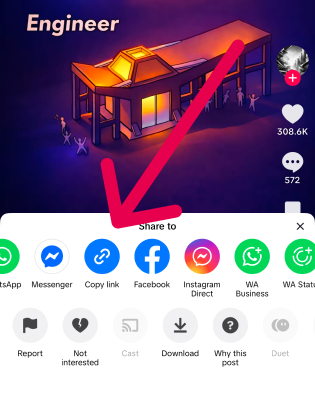
Open TikTok and copy the public video link.
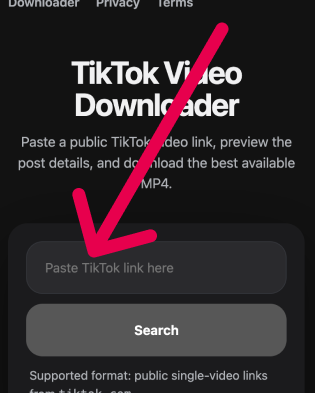
Paste the copied TikTok URL into the field above.
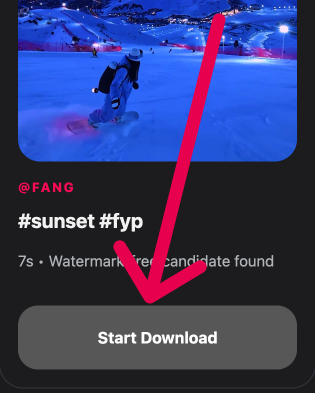
Click the download button and save the extracted TikTok audio file to your device.

Paste a public TikTok link and extract MP3 audio without creating an account or installing desktop software.

Get one MP3 output from the TikTok video so you can save the audio track separately from the video.

Load the video, preview it, and automatically start the MP3 download when it's ready.

Use the MP3 downloader from mobile or desktop browsers without additional apps.
Review the TikTok post details before you begin the MP3 preparation flow.
When the MP3 is ready, the browser download begins automatically without an extra button click.
Generated MP3 files are short-lived and removed after the configured TTL window.
The service processes audio on the server, keeping the experience stable and smooth.

Save audio from your own public TikTok posts for reuse, drafts, sound libraries, or repackaging in other tools.

Use public short audio clips in editing workflows, notes, and reference folders.

Archive approved TikTok audio clips for campaign research, moderation, or content planning.

Keep public TikTok audio examples for documentation, analysis, and media review.
Best when you only need the audio track from a public TikTok video in a portable, widely supported format.
Need the full video instead? Switch to the main downloader page to save the TikTok post as MP4.
tiktok.com. Profile pages, playlists, and private posts are not supported.